© The State of Open-Source FPGA Tools
From vendor lock-in to freedom: synthesising, routing, and programming FPGAs without proprietary toolchains

The Vendor Lock-in Problem
For decades, FPGA development operated under an implicit bargain: purchase the silicon, receive the tools. Xilinx provided Vivado, Intel (formerly Altera) provided Quartus, Lattice provided iCEcube and Radiant. These proprietary toolchains controlled every step from HDL synthesis through bitstream generation, creating an ecosystem where your choice of FPGA vendor dictated your entire development environment.
This model carries significant consequences. Toolchains consume tens of gigabytes of disk space. Installation requires license agreements and, for advanced features, expensive annual subscriptions. Build systems become vendor-specific, preventing code portability. Perhaps most critically, the bitstream formats remain undocumented -- you cannot understand what your FPGA is actually configured to do without trusting the vendor's black-box tools.

The Bitstream Black Box
Unlike software compilation where you can inspect assembly output, FPGA bitstreams have historically been opaque binary blobs. The vendor tools transform your HDL into configurations that program lookup tables, routing matrices, and I/O blocks, but the exact mapping remains proprietary. This opacity prevents independent verification, security auditing, and tool improvement by the community.
The situation mirrors the early days of software compilers before GCC democratised compilation. Imagine if every processor architecture required a different proprietary compiler with incompatible build systems and closed-source code generation. The software industry recognised this as untenable; the FPGA industry is only now catching up.
The IceStorm Revolution
The landscape shifted dramatically in 2015 when Clifford Wolf (now Claire Xenia Wolf) released Project IceStorm, a complete reverse-engineered toolchain for Lattice iCE40 FPGAs. For the first time, developers could synthesise, place, route, and generate bitstreams for a commercial FPGA using entirely open-source tools.
The achievement required painstaking reverse engineering. Wolf analysed bitstreams produced by Lattice's tools, identified patterns corresponding to logic configurations, and documented the entire bitstream format. The result was not merely academic -- IceStorm produces bitstreams that work on real hardware, enabling a complete open-source flow from Verilog to functioning FPGA.
Why Lattice iCE40?
The iCE40 family became the open-source FPGA of choice not because of technical superiority, but because of practical factors: small bitstreams (32KB for iCE40HX1K) made reverse engineering tractable, the architecture is relatively simple with uniform logic cells, and the devices are inexpensive enough for hobbyists. Lattice's relatively permissive stance towards the project also helped -- they never attempted legal action against IceStorm.
IceStorm demonstrated that open-source FPGA tools were possible. The subsequent years saw rapid expansion: Project Trellis documented Lattice ECP5 FPGAs, Project Apicula tackled Gowin devices, and Project X-Ray began the ambitious task of reverse-engineering Xilinx 7-Series bitstreams.
The Tool Ecosystem
Understanding open-source FPGA development requires appreciating how individual tools compose into complete flows. Unlike monolithic vendor toolchains, the open-source ecosystem assembles best-of-breed components, each handling a specific stage of the design process.
The following diagram illustrates the complete FPGA development flow, from HDL specification through to programmed hardware:
%%{init: {'flowchart': {'padding': 20, 'nodeSpacing': 30, 'rankSpacing': 40}}}%%
flowchart TD
    HDL["Verilog / VHDL"] --> YOSYS
    CONST["Constraints<br/>.pcf / .xdc"] --> PNR

    YOSYS["Yosys<br/>Synthesis"] -->|JSON Netlist| PNR

    PNR["nextpnr<br/>Place and Route"] -->|ASCII Config| PACK

    PACK["icepack / ecppack<br/>Bitstream Generation"] -->|Binary Bitstream| PROG

    PROG["openFPGALoader<br/>Programming"] --> FPGA["FPGA Hardware"]

    SIM["Verilator / Icarus<br/>Simulation"] -.->|Verification| HDL
    TB["cocotb<br/>Testbench"] -.-> SIM

    style HDL fill:#e1f5fe,stroke:#0288d1,color:#01579b
    style CONST fill:#e1f5fe,stroke:#0288d1,color:#01579b
    style YOSYS fill:#fff3e0,stroke:#f57c00,color:#e65100
    style PNR fill:#e8f5e9,stroke:#388e3c,color:#1b5e20
    style PACK fill:#e8f5e9,stroke:#388e3c,color:#1b5e20
    style PROG fill:#f3e5f5,stroke:#7b1fa2,color:#4a148c
    style FPGA fill:#f3e5f5,stroke:#7b1fa2,color:#4a148c
    style SIM fill:#fce4ec,stroke:#c2185b,color:#880e4f
    style TB fill:#fce4ec,stroke:#c2185b,color:#880e4f
Colour key: Design Inputs | Synthesis | Physical Implementation | Hardware | Verification
Learning FPGA Development
For a deeper introduction to FPGA concepts and development workflows, consider Getting Started with FPGAs by Russell Merrick or the FPGA Design for Embedded Systems specialisation on Coursera.
Synthesis: Yosys
Yosys (Yosys Open SYnthesis Suite) serves as the synthesis foundation for virtually all open-source FPGA and ASIC flows. Originally developed by Clifford Wolf alongside IceStorm, now maintained by YosysHQ, it transforms Verilog RTL into technology-mapped netlists.
Yosys operates through a pipeline of passes that progressively transform the design representation:
- Frontend: Parses Verilog (extensive Verilog-2005 support, growing SystemVerilog via Surelog/UHDM)
- Elaboration: Resolves hierarchy, parameters, and generate statements
- Optimisation: Technology-independent transformations (constant propagation, dead code elimination)
- Technology Mapping: Converts generic cells to target-specific primitives
For FPGA flows, Yosys provides dedicated synthesis commands for each architecture:
# Lattice iCE40
synth_ice40 -top ModuleName -json output.json

# Lattice ECP5
synth_ecp5 -top ModuleName -json output.json

# Gowin
synth_gowin -top ModuleName -json output.json

# Xilinx 7-Series (experimental)
synth_xilinx -top ModuleName -json output.json
The flexibility extends beyond pure synthesis. Yosys supports formal verification through SAT/SMT solving, enabling equivalence checking between RTL and gate-level representations. The SymbiYosys frontend provides bounded model checking for property verification.
Place and Route: nextpnr
nextpnr provides portable place-and-route for multiple FPGA architectures. Unlike vendor tools that implement architecture-specific algorithms, nextpnr uses a common timing-driven placement and routing engine with architecture-specific backends.
The tool accepts JSON netlists from Yosys and produces ASCII configuration files describing the physical implementation:
nextpnr-ice40 --hx1k --package vq100 \
    --json design.json \
    --pcf constraints.pcf \
    --asc design.asc
nextpnr supports multiple architectures through dedicated backends:
| Backend | Target | Maturity | Source |
|---|---|---|---|
nextpnr-ice40 | Lattice iCE40 | Production | Project IceStorm |
nextpnr-ecp5 | Lattice ECP5 | Production | Project Trellis |
nextpnr-gowin | Gowin LittleBee/Arora | Mature | Project Apicula |
nextpnr-nexus | Lattice Nexus | Development | Project Oxide |
nextpnr-himbaechel | Generic/Xilinx | Experimental | Various |
The placement algorithm uses simulated annealing to optimise wire length and timing, while routing employs a negotiated congestion approach similar to commercial tools. Python scripting enables custom constraints, floorplanning, and design space exploration.
Timing Reports
nextpnr provides detailed timing analysis, reporting critical paths and slack. For designs approaching timing limits, the --timing-allow-fail flag permits bitstream generation even with timing violations, useful for debugging but not recommended for production.
Bitstream Generation: Architecture-Specific Tools
Each FPGA architecture requires dedicated bitstream packing tools that encode the ASCII configuration into binary format:
- icepack (IceStorm): Converts
.ascto.binfor iCE40 devices - ecppack (Project Trellis): Generates
.bitfiles for ECP5 devices - gowin_pack (Project Apicula): Produces bitstreams for Gowin FPGAs
These tools handle architecture-specific details: sync patterns, CRC checksums, configuration frame ordering, and compression. The resulting bitstreams are functionally equivalent to those produced by vendor tools.
Programming: openFPGALoader
openFPGALoader provides universal FPGA programming across vendors and interfaces. Unlike vendor-specific programmers, it supports a remarkable range of devices and adapters:
Supported FPGA Vendors:
- Lattice (iCE40, ECP5, MachXO⅔, Nexus, CertusNX)
- Xilinx/AMD (Spartan, Artix, Kintex, Virtex, Zynq)
- Intel/Altera (Cyclone, MAX, Stratix)
- Gowin (LittleBee, Arora)
- Efinix (Trion, Titanium)
- Anlogic, Cologne Chip, and more
Supported Interfaces:
- FTDI chips (FT232H, FT2232H, FT4232H)
- JTAG adapters (DirtyJTAG, Bus Blaster, Tigard)
- Vendor cables (Xilinx Platform Cable, Intel USB Blaster)
- Direct SPI programming
# List supported boards
openFPGALoader --list-boards

# Program specific board
openFPGALoader -b ice40_generic design.bin

# Program via specific cable
openFPGALoader -c ft2232 design.bit

# Write to flash (persistent)
openFPGALoader -b arty --write-flash design.bit
Simulation and Verification
Production FPGA development requires verification before hardware deployment. The open-source ecosystem provides capable simulation tools that integrate with synthesis flows.
Verilator
Verilator compiles synthesisable Verilog/SystemVerilog to optimised C++ or SystemC models. Rather than interpreting HDL like traditional simulators, Verilator generates native code that executes 10-100x faster for many designs.
# Compile Verilog to C++ simulation
verilator --cc --exe --build -j 0 \
    design.v testbench.cpp

# Run simulation
./obj_dir/Vdesign
Verilator excels at cycle-accurate simulation of large designs and integrates naturally with C++ testbenches. However, it only supports synthesisable constructs -- behavioural Verilog features like delays and fork-join require alternative simulators.
Icarus Verilog

Icarus Verilog provides a traditional event-driven Verilog simulator supporting the complete IEEE 1364 standard. While slower than Verilator for large designs, it handles behavioural constructs essential for many testbenches:
# Compile and simulate
iverilog -o design.vvp design.v testbench.v
vvp design.vvp

# Generate waveform
vvp design.vvp -lxt2
gtkwave design.lxt
GHDL
For VHDL designers, GHDL provides analysis, compilation, and simulation. Uniquely, GHDL can also synthesise VHDL through integration with Yosys via the ghdl-yosys-plugin, enabling pure VHDL open-source FPGA flows.
cocotb
cocotb revolutionises testbench development by enabling Python-based verification. Rather than writing testbenches in HDL, designers use Python coroutines that interface with any simulator:
cocotb works with Verilator, Icarus, GHDL, and commercial simulators, providing a unified verification approach regardless of underlying simulator choice.
import cocotb
from cocotb.triggers import RisingEdge, Timer

@cocotb.test()
async def test_toggle(dut):
    """Test LED toggles on switch press."""
    dut.i_Switch_1.value = 0

    for _ in range(10):
        await RisingEdge(dut.i_Clk)

    # Press switch
    dut.i_Switch_1.value = 1
    await Timer(100, units='ns')
    dut.i_Switch_1.value = 0

    for _ in range(10):
        await RisingEdge(dut.i_Clk)

    assert dut.o_LED_1.value == 1, "LED should be on"
GTKWave
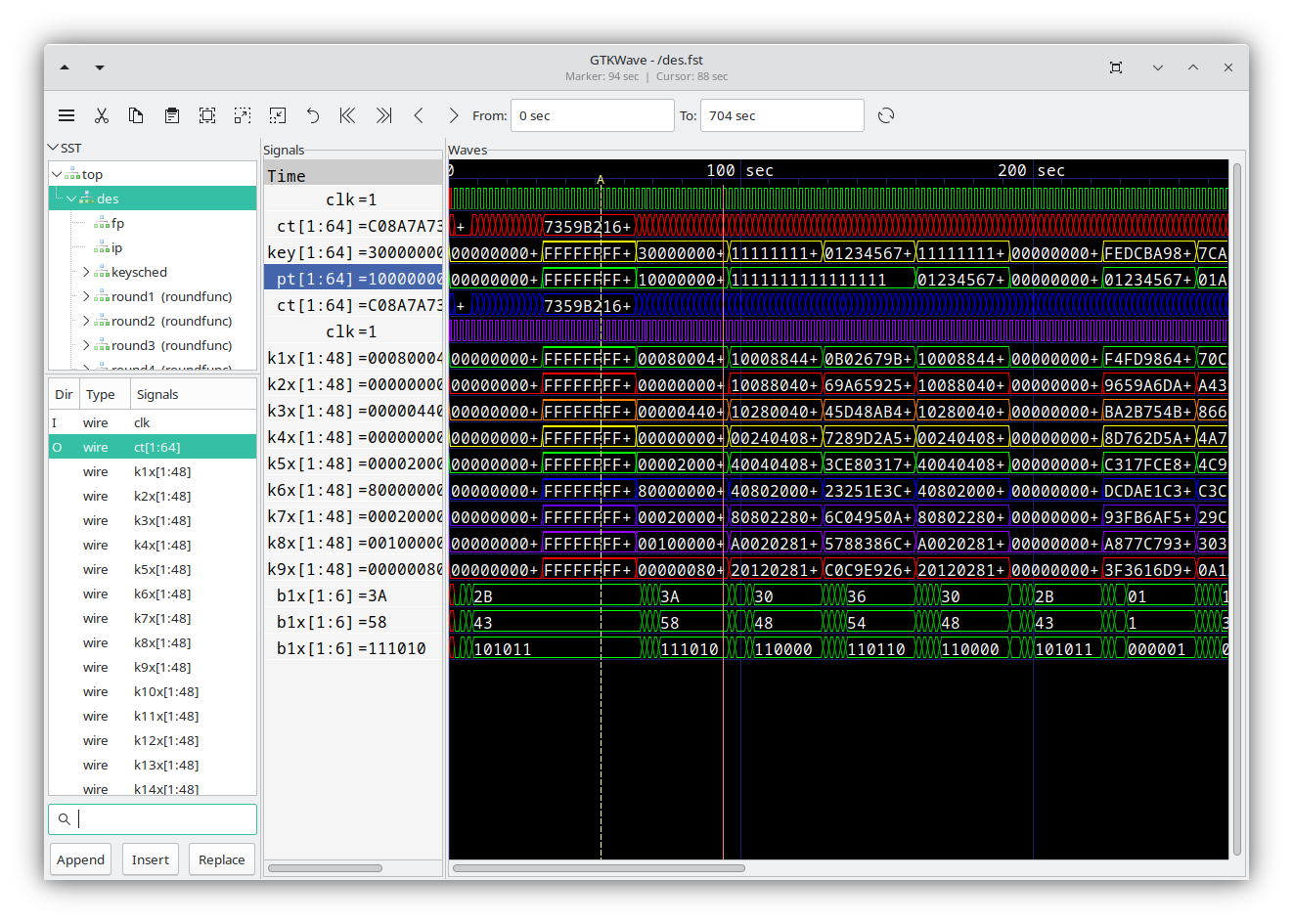
GTKWave displays waveforms generated during simulation, providing the visual debugging interface essential for understanding signal behaviour over time. Unlike commercial waveform viewers bundled with vendor tools, GTKWave runs on Linux, macOS, and Windows, integrating seamlessly with any simulator that outputs standard formats.
Supported formats include VCD (Value Change Dump -- the IEEE 1364 standard), FST (Fast Signal Trace -- GTKWave's own compressed format offering 5-10x smaller files), LXT/LXT2 (legacy compressed formats), and GHW (GHDL's native waveform format). For large simulations, FST is recommended as it supports random access without loading the entire file into memory.
Key features that make GTKWave indispensable for debugging:
- Signal search and filtering: Quickly locate signals in complex hierarchies using pattern matching
- Markers and cursors: Place multiple time markers to measure delays and compare events
- Analog waveform display: Render bus values as analog traces for visualising DAC outputs or filter responses
- Transaction filters: Apply Tcl scripts to decode protocol transactions (SPI, I2C, UART) into human-readable annotations
- Save/restore sessions: Preserve signal selections and display settings between debugging sessions
# Generate FST waveform with Verilator (faster than VCD)
verilator --cc --exe --build --trace-fst design.v testbench.cpp
./obj_dir/Vdesign
gtkwave waveform.fst

# Or with Icarus Verilog using VCD
iverilog -o sim.vvp design.v testbench.v
vvp sim.vvp
gtkwave dump.vcd
HDL Alternatives
While Verilog and VHDL remain the standard HDLs, the open-source ecosystem has spawned alternative hardware description approaches that leverage modern programming language features.
Amaranth (formerly nMigen)
Amaranth embeds hardware description in Python, enabling metaprogramming and strong typing:
Amaranth generates Verilog for synthesis, enabling use with standard open-source flows while providing Python's expressiveness for design capture.
SpinalHDL
SpinalHDL uses Scala for hardware description, providing strong typing and powerful component composition. The VexRiscv RISC-V CPU demonstrates SpinalHDL's capability for complex, configurable designs.
Chisel
Chisel, developed at UC Berkeley, also embeds in Scala and produces the FIRRTL intermediate representation. The RISC-V Rocket and BOOM cores use Chisel, demonstrating production-quality results.
Clash
Clash brings Haskell's type system to hardware design, enabling functional programming approaches with strong correctness guarantees.
Complete Flows: F4PGA
The F4PGA project (formerly SymbiFlow) coordinates open-source FPGA tools into a unified, vendor-neutral flow analogous to GCC for software. F4PGA integrates Yosys, nextpnr, and architecture documentation projects into a cohesive toolchain.
The vision is compelling: a single command-line interface targeting multiple FPGA architectures, abstracting vendor differences while maintaining access to device-specific features. Current support focuses on Lattice and Xilinx 7-Series devices, with ongoing expansion.
RISC-V on Open-Source FPGAs
The convergence of open-source FPGA tools and open-source processor architectures creates powerful synergies. Several RISC-V implementations target open-source FPGA flows:
| Core | Language | Size | Features |
|---|---|---|---|
| PicoRV32 | Verilog | Minimal | Yosys-optimised, configurable |
| SERV | Verilog | Smallest | Bit-serial, award-winning area efficiency |
| VexRiscv | SpinalHDL | Configurable | Pipeline, caches, MMU options |
| Rocket | Chisel | Full-featured | SoC generator, Linux-capable |
These cores run entirely through open-source flows, from HDL synthesis through bitstream generation. Combined with LiteX for SoC generation, complete systems with CPUs, memory controllers, and peripherals can be built without proprietary tools.
Comparison: Open-Source vs Vendor Tools
Honest assessment requires acknowledging trade-offs. Vendor tools have decades of optimisation and architecture-specific knowledge that open-source tools are still developing.
| Aspect | Vendor Tools | Open-Source Tools |
|---|---|---|
| Quality of Results | Optimised for architecture | Good, improving rapidly |
| Compilation Speed | Often slow (minutes) | Generally fast (seconds) |
| Disk Space | 10-50+ GB | < 1 GB |
| License Cost | Free to expensive | Free |
| Device Support | Complete for vendor | Varies by architecture |
| Documentation | Comprehensive | Variable |
| Scripting | TCL-based | Python, TCL |
| Transparency | Black box | Full source access |
| Reproducibility | Version-dependent | Deterministic builds possible |
For Lattice iCE40 and ECP5, open-source tools achieve results comparable to vendor tools for most designs. Xilinx support remains experimental, suitable for research but not production. Intel/Altera has minimal open-source support.
When to Use Vendor Tools
For production designs on Xilinx or Intel FPGAs, vendor tools remain necessary. The open-source flow excels for: learning (fast iteration, transparent operation), Lattice designs (production-ready), research (reproducible, modifiable), and CI/CD integration (scriptable, lightweight).
Practical Demo: Programming the GO Board

Theory becomes meaningful through practice. This section demonstrates a complete open-source FPGA workflow using the Nandland GO Board, a beginner-friendly development board featuring a Lattice iCE40HX1K FPGA.
Hardware Overview
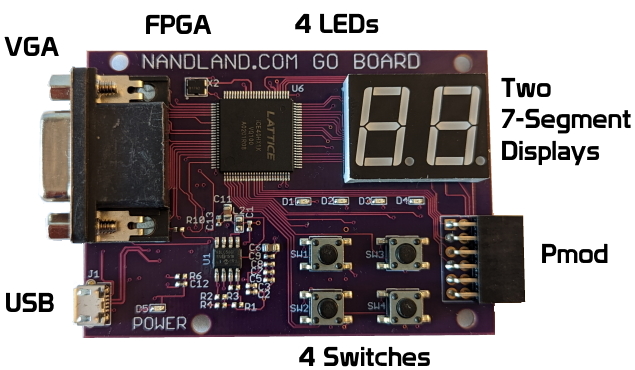
The GO Board provides an ideal platform for learning:
- FPGA: Lattice iCE40HX1K-VQ100 (1,280 logic cells)
- Clock: 25 MHz oscillator
- I/O: 4 LEDs, 4 push-button switches, 2 seven-segment displays
- Interfaces: UART, VGA output, PMOD connectors
- Programming: FTDI FT2232H USB interface
Tool Installation
On macOS, the open-source FPGA toolchain installs via Homebrew:
# Add the YosysHQ tap for FPGA tools
brew tap YosysHQ/oss-cad-suite

# Install the complete toolchain
brew install yosys nextpnr icestorm

# Install the universal programmer
brew install openfpgaloader
Alternatively, download the pre-built OSS CAD Suite containing all tools:
# Download and extract (macOS Apple Silicon example)
curl -L -o oss-cad-suite.tgz \
    https://github.com/YosysHQ/oss-cad-suite-build/releases/download/2024-12-09/oss-cad-suite-darwin-arm64-20241209.tgz
tar -xzf oss-cad-suite.tgz -C ~/

# Activate environment
source ~/oss-cad-suite/environment
Verifying the Installation
Confirm tools are available:
# Check Yosys version
yosys -V
# Yosys 0.45 (git sha1 ...)

# Check nextpnr version
nextpnr-ice40 --version
# nextpnr-ice40 -- Next Generation Place and Route

# List supported boards for programming
openFPGALoader --list-boards | grep -i ice
# ice40_generic
# ...
Example Design: LED Toggle
A simple design demonstrates the complete flow. This Verilog module toggles an LED each time a switch is pressed:
// LED_Toggle.v
module LED_Toggle (
    input  i_Clk,
    input  i_Switch_1,
    output o_LED_1
);

    reg r_LED_1    = 1'b0;
    reg r_Switch_1 = 1'b0;

    always @(posedge i_Clk) begin
        r_Switch_1 <= i_Switch_1;

        // Detect falling edge (switch release)
        if (i_Switch_1 == 1'b0 && r_Switch_1 == 1'b1)
            r_LED_1 <= ~r_LED_1;
    end

    assign o_LED_1 = r_LED_1;

endmodule
Pin Constraints
The constraints file maps Verilog signals to physical FPGA pins:
# Go_Board_Constraints.pcf

# 25 MHz Clock
set_io i_Clk 15

# Push-button Switch 1
set_io i_Switch_1 53

# LED 1
set_io o_LED_1 56
Build Process
Execute the complete flow with individual commands:
# Stage 1: Synthesis (Verilog -> JSON netlist)
yosys -p "synth_ice40 -top LED_Toggle -json led_toggle.json" LED_Toggle.v

# Stage 2: Place and Route (JSON -> ASCII configuration)
nextpnr-ice40 --hx1k --package vq100 \
    --json led_toggle.json \
    --pcf Go_Board_Constraints.pcf \
    --asc led_toggle.asc

# Stage 3: Bitstream Generation (ASCII -> Binary)
icepack led_toggle.asc led_toggle.bin
Full Console Output: Synthesis (Yosys)
/----------------------------------------------------------------------------\
 |  yosys -- Yosys Open SYnthesis Suite                                       |
 |  Copyright (C) 2012 - 2025  Claire Xenia Wolf <claire@yosyshq.com>         |
 |  Distributed under an ISC-like license, type "license" to see terms        |
 \----------------------------------------------------------------------------/
 Yosys 0.58+98 (git sha1 797780eda, aarch64-apple-darwin23.5-clang++ 18.1.8 -fPIC -O3)

-- Parsing `LED_Toggle_Project.v' using frontend ` -vlog2k' --

1. Executing Verilog-2005 frontend: LED_Toggle_Project.v
Parsing Verilog input from `LED_Toggle_Project.v' to AST representation.
Storing AST representation for module `$abstract\LED_Toggle_Project'.
Successfully finished Verilog frontend.

-- Running command `synth_ice40 -top LED_Toggle_Project -json led_toggle.json' --

2. Executing SYNTH_ICE40 pass.

2.1. Executing Verilog-2005 frontend: .../share/yosys/ice40/cells_sim.v
Generating RTLIL representation for module `\SB_IO'.
Generating RTLIL representation for module `\SB_LUT4'.
Generating RTLIL representation for module `\SB_DFF'.
Generating RTLIL representation for module `\SB_DFFE'.
... (loading iCE40 cell library)
Successfully finished Verilog frontend.

2.2. Executing HIERARCHY pass (managing design hierarchy).

2.3. Executing AST frontend in derive mode using pre-parsed AST for module `\LED_Toggle_Project'.
Generating RTLIL representation for module `\LED_Toggle_Project'.

2.4. Executing PROC pass (convert processes to netlists).
Creating register for signal `\LED_Toggle_Project.\r_LED_1' using process.
  created $dff cell `$procdff$390' with positive edge clock.
Creating register for signal `\LED_Toggle_Project.\r_Switch_1' using process.
  created $dff cell `$procdff$391' with positive edge clock.

... (optimization passes: OPT_EXPR, OPT_MERGE, OPT_MUXTREE, OPT_REDUCE, etc.)

2.32. Executing TECHMAP pass (map to technology primitives).
Using extmapper simplemap for cells of type $not.
Using extmapper simplemap for cells of type $logic_and.
Using extmapper simplemap for cells of type $dffe.
Using extmapper simplemap for cells of type $dff.
No more expansions possible.

... (ABC9 logic optimization)

2.49. Printing statistics.

=== LED_Toggle_Project ===

        Number of wires:                  7
        Number of wire bits:              7
        Number of public wires:           7
        Number of public wire bits:       7
        Number of ports:                  3
        Number of port bits:              3
        Number of cells:                  4
          SB_DFF                          1
          SB_DFFE                         1
          SB_LUT4                         2

2.50. Executing CHECK pass (checking for obvious problems).
Checking module LED_Toggle_Project...
Found and reported 0 problems.

2.51. Executing JSON backend.

End of script. Logfile hash: 4e2401a794, CPU: user 0.32s system 0.03s
Yosys 0.58+98 (git sha1 797780eda)
Time spent: 75% 21x read_verilog (0 sec), 9% 1x abc9_exe (0 sec), ...
Full Console Output: Place and Route (nextpnr)
Info: constrained 'i_Clk' to bel 'X0/Y8/io1'
Info: constrained 'o_LED_1' to bel 'X13/Y6/io1'
Info: constrained 'i_Switch_1' to bel 'X13/Y4/io1'
Warning: unmatched constraint 'o_LED_2' (on line 10)
Warning: unmatched constraint 'o_LED_3' (on line 11)
... (warnings for unused pins in constraints file - normal)

Info: Packing constants..
Info: Packing IOs..
Info: Packing LUT-FFs..
Info:        1 LCs used as LUT4 only
Info:        1 LCs used as LUT4 and DFF
Info: Packing non-LUT FFs..
Info:        1 LCs used as DFF only
Info: Packing carries..
Info: Packing RAMs..
Info: Placing PLLs..
Info: Packing special functions..
Info: Promoting globals..
Info: promoting i_Clk$SB_IO_IN (fanout 2)
Info: Constraining chains...
Info: Checksum: 0xb82b2d21

Info: Device utilisation:
Info:            ICESTORM_LC:       5/   1280     0%
Info:           ICESTORM_RAM:       0/     16     0%
Info:                  SB_IO:       3/    112     2%
Info:                  SB_GB:       1/      8    12%
Info:           ICESTORM_PLL:       0/      1     0%
Info:            SB_WARMBOOT:       0/      1     0%

Info: Placed 3 cells based on constraints.
Info: Creating initial analytic placement for 4 cells, random placement wirelen = 27.
Info:     at initial placer iter 0, wirelen = 2
Info: Running main analytical placer, max placement attempts per cell = 10000.
Info: HeAP Placer Time: 0.00s

Info: Running simulated annealing placer for refinement.
Info:   at iteration #1: temp = 0.000000, timing cost = 1, wirelen = 4
Info: SA placement time 0.00s

Info: Max frequency for clock 'i_Clk$SB_IO_IN_$glb_clk': 454.75 MHz (PASS at 12.00 MHz)

Info: Max delay <async>                         -> posedge i_Clk$SB_IO_IN_$glb_clk: 1.65 ns
Info: Max delay posedge i_Clk$SB_IO_IN_$glb_clk -> <async>                        : 1.13 ns

Info: Routing..
Info: Setting up routing queue.
Info: Routing 9 arcs.
Info:            |   (re-)routed arcs  |   delta    | remaining|       time spent     |
Info:    IterCnt |  w/ripup   wo/ripup |  w/r  wo/r |      arcs| batch(sec) total(sec)|
Info:          9 |        0          9 |    0     9 |         0|       0.01       0.01|
Info: Routing complete.
Info: Router1 time 0.01s

Info: Critical path report for clock 'i_Clk$SB_IO_IN_$glb_clk' (posedge -> posedge):
Info: clk-to-q  0.54ns  Source r_Switch_1_SB_DFF_Q_DFFLC.O
Info: routing   0.59ns  Net r_Switch_1
Info: logic     0.31ns  Source i_Switch_1_SB_LUT4_I2_LC.O
Info: routing   0.93ns  Net r_LED_1_SB_DFFE_Q_E
Info: setup     0.10ns
Info: 0.95 ns logic, 1.52 ns routing

Info: Max frequency for clock 'i_Clk$SB_IO_IN_$glb_clk': 404.04 MHz (PASS at 12.00 MHz)
41 warnings, 0 errors

Info: Program finished normally.
The synthesis stage reports resource usage:
Info: Device utilisation:
Info:            ICESTORM_LC:     5/ 1280     0%
Info:                SB_IO:       3/  112     2%
Info:                SB_GB:       1/    8    12%
Info:         ICESTORM_RAM:     0/   16     0%
Info:        ICESTORM_PLL:      0/    1     0%
Programming the FPGA
Connect the GO Board via USB and program:
# Program the FPGA (writes to flash for persistence across power cycles)
openFPGALoader -b ice40_generic led_toggle.bin
Expected output:
empty
Can't read iSerialNumber field from FTDI: considered as empty string
Jtag frequency : requested 6.00MHz   -> real 6.00MHz
Parse file DONE
Detail:
Jedec ID          : 20
memory type       : 20
memory capacity   : 11
00
flash chip unknown: use basic protection detection
start addr: 00000000, end_addr: 00010000
Erasing: [==================================================] 100.00%
Done
Writing: [==================================================] 100.00%
Done
Wait for CDONE DONE
The "empty" and FTDI messages are normal -- the GO Board's FT2232H chip lacks a serial number string. The key indicators of success are the progress bars reaching 100% and "CDONE DONE" confirming the FPGA has loaded the configuration.
The FPGA immediately starts executing. Press Switch 1 -- the LED toggles on release. Press again -- it toggles off. The entire flow from Verilog to functioning hardware takes seconds.

Makefile Automation
For repeated development, a Makefile automates the flow:
# Makefile for iCE40 FPGA projects

DEVICE = hx1k
PACKAGE = vq100
PCF = Go_Board_Constraints.pcf

TOP ?= LED_Toggle
SRC ?= LED_Toggle.v

PROJECT = $(shell echo $(TOP) | tr '[:upper:]' '[:lower:]' | tr '_' '-')

.PHONY: all program clean

all: $(PROJECT).bin

$(PROJECT).json: $(SRC)
    yosys -p "synth_ice40 -top $(TOP) -json $@" $<

$(PROJECT).asc: $(PROJECT).json $(PCF)
    nextpnr-ice40 --$(DEVICE) --package $(PACKAGE) \
        --json $< --pcf $(PCF) --asc $@

$(PROJECT).bin: $(PROJECT).asc
    icepack $< $@

program: $(PROJECT).bin
    openFPGALoader -b ice40_generic $<

clean:
    rm -f *.json *.asc *.bin
Usage:
# Activate toolchain once per terminal session
source ~/oss-cad-suite/environment

# Build
make TOP=LED_Toggle SRC=LED_Toggle.v

# Flash to FPGA
make program TOP=LED_Toggle SRC=LED_Toggle.v

# Clean build artefacts
make clean
The Path Forward
Open-source FPGA tools have matured from proof-of-concept to production-ready for supported architectures. The trajectory parallels open-source software tools: GCC and LLVM now compete with proprietary compilers; Yosys and nextpnr increasingly compete with vendor toolchains.
Several frontiers demand continued development:
- Xilinx/AMD Support: Project X-Ray and nextpnr-xilinx show promise but require significant work for production readiness
- Intel/Altera: Minimal open-source support exists; the Mistral project has made initial progress
- Timing Closure: Advanced timing optimisation techniques from commercial tools remain areas for improvement
- High-Level Synthesis: Open-source HLS tools lag behind commercial offerings
The organisational model continues evolving. YosysHQ provides commercial support and consulting whilst maintaining open-source development. The CHIPS Alliance coordinates broader ecosystem efforts. University research groups contribute algorithmic advances.
The Democratisation Effect
Open-source FPGA tools lower barriers in ways beyond cost. A student can install the toolchain in minutes without license negotiations. A startup can integrate FPGA builds into CI/CD without per-seat licensing. A researcher can modify tools to test new algorithms. A hobbyist can understand exactly what their design becomes. These capabilities compound, accelerating learning and innovation across the ecosystem.
Conclusion
The open-source FPGA ecosystem has reached a inflection point. For Lattice iCE40 and ECP5 devices, the toolchain is production-ready, with thousands of designs successfully deployed. For learning and research, open-source tools provide transparency and rapid iteration that proprietary tools cannot match. For other architectures, the trajectory is clear even if the destination remains years away.
The combination of open-source tools, inexpensive development boards like the GO Board, and educational resources has democratised FPGA development in ways unimaginable a decade ago. A complete synthesis, place-and-route, and programming toolchain runs in seconds, fits in hundreds of megabytes, and costs nothing. The iteration cycle from code change to hardware verification takes less time than launching some vendor tools.
For those beginning FPGA development, the open-source path offers distinct advantages: simpler installation, faster compilation, transparent operation, and a community invested in education and accessibility. For experienced developers, it provides automation, reproducibility, and freedom from vendor lock-in. For researchers, it enables algorithm development and benchmarking impossible with closed-source tools.
The question is no longer whether open-source FPGA tools are viable -- thousands of working designs prove they are. The question is how quickly the ecosystem expands to cover more architectures and how many developers seize the opportunity to work with hardware as openly as they work with software.
Further Resources
Tools and Flows
- YosysHQ OSS CAD Suite - Complete pre-built toolchain
- Yosys - Open synthesis suite
- nextpnr - Portable FPGA place and route
- Project IceStorm - Lattice iCE40 tools
- Project Trellis - Lattice ECP5 tools
- openFPGALoader - Universal FPGA programmer
- F4PGA - FOSS Flows For FPGA
Simulation and Verification
- Verilator - Fast Verilog/SystemVerilog simulator
- Icarus Verilog - IEEE 1364 Verilog simulator
- GHDL - VHDL analyser and simulator
- cocotb - Python-based verification
- GTKWave - Waveform viewer
HDL Alternatives
- Amaranth - Python-based HDL
- SpinalHDL - Scala-based HDL
- Chisel - Scala hardware construction language
- LiteX - Python SoC builder
Development Boards
- Nandland GO Board - iCE40HX1K learning platform
- iCEBreaker - iCE40UP5K with PMOD expansion
- ULX3S - ECP5 with extensive I/O
- OrangeCrab - ECP5 in Feather form factor
Learning Resources
- Getting Started with FPGAs - Nandland tutorial series
- FPGA4Fun - Project-based learning
- ZipCPU Blog - Advanced FPGA topics
- FOSSi Foundation - Free and Open Source Silicon Foundation
Community
- YosysHQ Community - Tool development and support
- CHIPS Alliance - Open-source hardware ecosystem
- 1BitSquared Discord - Open-source FPGA community
- FOSSi Dial-Up Talks - Monthly online presentations
References
-
Wolf, C. (2015). "Project IceStorm." Chaos Communication Congress. ↩
-
Shah, D., Gnanasekaran, E., Birber, K., & Wolf, C. (2019). "nextpnr: An Open-Source Cross-Platform Place and Route Tool." WOSET Workshop at ICCAD. ↩
-
YosysHQ. (2024). "Yosys Open SYnthesis Suite Manual." ↩
-
Benz, F., Seffrin, A., & Huss, S. A. (2012). "Bil: A Tool-Chain for Bitstream Reverse-Engineering." FPL. ↩